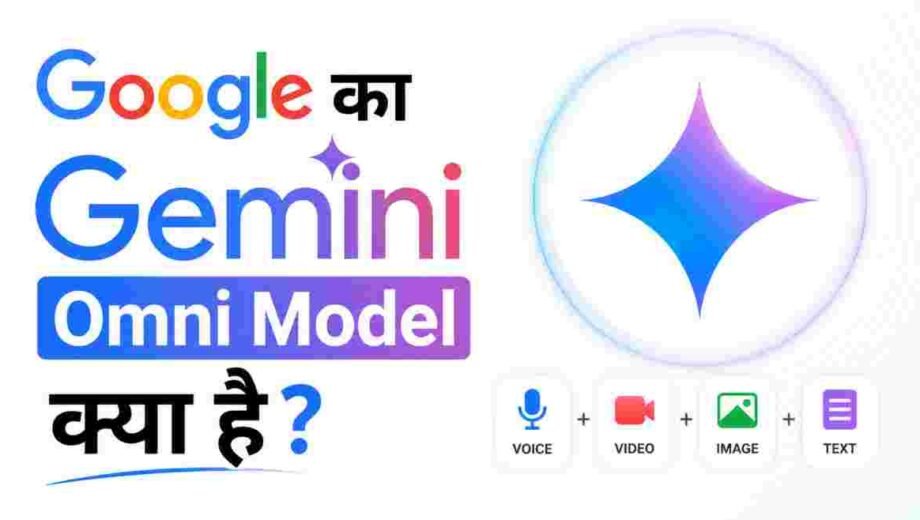

19 मई 2026 को Google I/O में जो announcement हुई, उसने AI की दुनिया को एक बार फिर हिला दिया। Google ने Gemini Omni को launch किया और एक साथ यह साबित कर दिया कि अब video editing के लिए आपको किसी software की जरूरत नहीं, बस बातें करनी हैं।
सोचिए आप किसी को बोलें, “इस video में लाइटें music के साथ बदलने लगें” और वो हो जाए। या आप कहें “violin बजाने वाले को किसी और environment में ले जाओ” और एक click में scene बदल जाए। यही Gemini Omni करता है।
यह article आपको Gemini Omni के बारे में वो सब बताएगा जो आपको जानना चाहिए। इसकी technology से लेकर credit system तक, Veo 3 से comparison से लेकर इसे use करने के तरीके तक। पूरा, सटीक, और आसान भाषा में।
Gemini Omni Model क्या है? Simple शब्दों में समझें
Gemini Omni Google DeepMind का एक नया AI model है जो “create anything from any input” के principle पर काम करता है। यानी आप उसे text दें, image दें, audio दें, या video दें, और वो उन सबको मिलाकर एक high-quality video output दे सकता है।
Google DeepMind के CTO और Chief AI Architect Koray Kavukcuoglu ने इसे launch करते हुए कहा कि यह model Gemini की reasoning power को creative media generation के साथ जोड़ता है। यानी यह सिर्फ video बनाता नहीं, यह समझता भी है कि video में क्या होना चाहिए।
DeepMind के CEO Demis Hassabis ने stage पर इसे describe करते हुए कहा: “Omni is our new model that can create anything from any input।” यह सिर्फ एक marketing line नहीं है, यह technically सच है।
Gemini Omni को “Nano Banana for Video” क्यों कहते हैं?
इसे समझने के लिए पहले Nano Banana को समझना होगा। 2025 में Google ने Nano Banana नाम का एक image model launch किया था। यह model इतना intelligent था कि आप बस text में बोलो “इस photo में पुराने बुजुर्ग को restore करो” और वो कर देता था। बिना Photoshop, बिना किसी technical skill के।
Gemini Omni वही काम video के लिए करता है। जैसे Nano Banana ने image editing को conversational बना दिया, वैसे ही Omni ने video creation और editing को conversation में बदल दिया है।
Google DeepMind ने officially कहा है: “Think of Gemini Omni like Nano Banana, but for video।” यह comparison बताता है कि Omni का vision कितना ambitious है।
Gemini Omni Flash: पहला Model Family का पहला Member
Gemini Omni एक model family है। इसका पहला और अभी available member है Gemini Omni Flash। यह 19 मई 2026 को launch हुआ।
Flash variant को speed और accessibility के लिए बनाया गया है। यह 10-second clips generate कर सकता है। यह limit कोई model limitation नहीं है, बल्कि Google ने जानबूझकर launch के समय इसे इस cap पर रखा है ताकि compute demand manageable रहे।
आगे चलकर Gemini Omni Pro और अन्य variants आएंगे जो longer clips और advanced features support करेंगे। Image और audio output support भी जल्द आने वाला है।
Gemini Omni की Architecture: यह कैसे काम करता है?
Gemini Omni एक unified multimodal model है। इसका मतलब यह है कि यह अलग-अलग AI models को connect नहीं करता, बल्कि सब कुछ एक ही system के अंदर होता है।
इसमें तीन major Google AI systems का integration है।
पहला है Veo, जो Google का video generation model है। Veo 3.1 तक आते-आते यह 4K quality, synchronized audio, और 60-second clips generate करने में capable हो गया था। Omni में Veo का video generation engine use होता है।
दूसरा है Nano Banana, जो image understanding और editing के लिए है। Omni को image inputs process करने और visual consistency maintain करने में यही help करता है।
तीसरा है Genie, जो Google का broader generative system है। यह Omni को complex creative tasks और world modeling में help करता है।
इन तीनों को Gemini की reasoning और knowledge के साथ combine करने पर जो बनता है, वह है Gemini Omni। यह combination इसे किसी भी standalone video tool से अलग बनाता है।
Gemini Omni क्या-क्या कर सकता है? पूरी Capability List
1. Conversational Video Editing
यह Omni का सबसे groundbreaking feature है। आप एक video लें और बस बातों में बताएं कि क्या change करना है। हर instruction पिछले instruction के ऊपर build होती है।
Example: पहले आप बोलें “एक violinist की video बनाओ।” फिर बोलें “उसे किसी forest environment में ले जाओ।” फिर “violin invisible कर दो।” फिर “camera angle shoulder के पीछे से कर दो।” हर बार video update होती है, और characters, lighting, environment की consistency बनी रहती है।
Google का official statement है: “Every instruction builds on the last. Your characters stay consistent, the physics hold up and the scene remembers what came before।”
2. World Transformation
आप एक real video लें और Omni से कहें कि इसकी पूरी दुनिया बदल दो। एक sculpture को bubbles से बना दो। एक आदमी जब mirror को touch करे तो mirror liquid की तरह ripple करे और उसकी arm mirror material में बदल जाए।
यह सिर्फ filter या effect नहीं है। यह physics-aware transformation है जहां Omni समझता है कि objects कैसे behave करते हैं।
3. Physics-Aware Video Generation
Gemini Omni को gravity, kinetic energy, और fluid dynamics की improved understanding है। जब आप “एक marble तेज़ी से chain reaction track पर rolling करे” जैसा prompt दें, तो Omni वास्तविक physics के हिसाब से उसे animate करता है।
पुराने AI video tools में objects unrealistically behave करते थे। Omni में यह problem काफी हद तक solve हुई है।
4. Multi-Input Reference System
यह feature game-changer है। आप एक साथ एक image, एक video clip, और एक audio file दे सकते हैं और Omni उन सबको एक coherent output में blend करेगा।
Example prompt जो Google ने demo किया: एक sci-fi film style video बनाओ जो image_0.png पर based हो, जिसके elements video_0.mp4 जैसे light करें और audio_0.wav के beat के साथ synchronize करें। यह एक prompt में image + video + audio तीनों का combination है।
5. Character और Style Consistency
अगर आपने किसी character की image दी है तो Omni उस character को multiple edits के across consistent रखता है। यह professional animation studios के लिए बहुत valuable feature है जहां character consistency सबसे बड़ी challenge होती है।
6. Drawing से Realistic Video
आप एक rough drawing बनाएं, उसे Omni को दें और बोलें “इसे realistic footage में convert करो, drawing सिर्फ movement guide है।” Omni drawing को समझेगा और उस movement को real-world style में execute करेगा।
7. World Knowledge से Video Creation
यह वो feature है जो Omni को Veo से fundamentally अलग बनाता है। Omni Gemini की knowledge से connected है। यानी यह history, science, culture, और real-world context समझता है।
Demo prompt: 26 letters के 26 unusual items की video बनाओ, हर letter के लिए एक item, lower thirds के साथ, specific visual style में, smooth background music के साथ। इस तरह का complex, knowledge-intensive request केवल Gemini की world knowledge के साथ possible है।
8. Digital Avatar Feature
Omni में आप अपना digital avatar बना सकते हैं। यह आपकी voice और appearance को capture करके एक digital version create करता है। फिर आप उस avatar से videos generate कर सकते हैं जो आप जैसी दिखें और आवाज़ भी आपकी हो।
सभी videos में SynthID का invisible watermark automatically embed होता है जिससे verify किया जा सकता है कि video AI से बनी है।
Gemini Omni vs Veo 3: दोनों में क्या फर्क है?
यह सबसे common confusion है। लोग सोचते हैं Gemini Omni ने Veo 3 को replace कर दिया। सच इससे अलग है।
Google अब parallel में दो flagship video models ship कर रहा है क्योंकि दोनों different jobs के लिए बने हैं।
Gemini Omni एक unified multimodal model है जहां text, image, audio और video सब input में जाते हैं और video output में आता है। यह conversational editing में strong है, multi-turn refinement के लिए best है। Flash tier में 10-second clips generate करता है। यह storyboarding, moodboard-to-video, और iterative editing के लिए ideal है।
Veo 3 एक dedicated video generation model है जो text और image input लेता है और native 4K quality output देता है। 60-second तक clips generate कर सकता है। Long-form cinematic content के लिए best है। यह production-grade video के लिए ideal है।
सबसे effective AI video workflow में दोनों tools एक साथ use होते हैं। Omni से iterative editing और storyboarding करें, Veo 3 से final high-quality render लें।
Gemini Omni vs पुराने Gemini Models: क्या नया आया?
पिछले Gemini models मुख्यतः text, image और code generation में strong थे। Video generation Veo models के through अलग से होती थी। यह एक fragmented experience था जहां user को अलग-अलग tools switch करने पड़ते थे।
Gemini Omni ने यह gap close किया। अब Gemini की intelligence और video generation एक ही conversation में possible है। पहले आप text से Gemini से idea generate करते, फिर Veo पर जाकर video बनाते। अब यह सब एक ही flow में होता है।
इसके अलावा Omni की physics understanding पहले के किसी Gemini model में नहीं थी। Real-world objects का behavior समझना और उसे video में accurately represent करना यह नई capability है।
Multi-turn conversational editing भी नया है। पहले हर generation एक fresh start था। Omni में context carry forward होता है।
Credit System: Gemini Omni Use करने के लिए क्या चाहिए?
यह section बहुत important है। Gemini Omni free नहीं है, लेकिन इसे access करने के कई रास्ते हैं। समझते हैं complete structure।
Google AI Free Plan
Free plan में Gemini 3.5 Flash और limited Gemini 3.1 Pro access मिलता है। Video generation के लिए 100 monthly AI credits मिलते हैं जो Whisk और Flow के through use होते हैं। Veo 3 तक limited access है। यह casual exploration के लिए ठीक है लेकिन Gemini Omni Flash का full experience इसमें limited होगा।
Google AI Plus Plan
Plus plan में Gemini Omni Flash का access मिलता है Gemini app और Google Flow के through। यह entry-level plan है जो basic Omni video creation enable करता है। AI credits ज्यादा होते हैं और multi-turn editing possible है।
Google AI Pro Plan: ₹1,900/month (approx.)
Pro plan Gemini Omni के लिए सबसे popular choice है। इसमें मिलता है Gemini 3.1 Pro full access, 1,000 monthly AI credits, Gemini Omni for video generation, Veo 3.1 video generation, advanced multi-turn filmmaking pipelines in Google Flow, 5TB cloud storage, Gemini Code Assist, और unlimited slide generation। यह serious creators और professionals के लिए ideal plan है।
Google AI Ultra Plan: ₹24000/month (approx.)
Ultra plan maximum capabilities देता है। Gemini 3.1 Pro full access, highest compute limits, high-limit studio compute bounds in Google Flow, और Gemini Omni का maximum access। Enterprise और studio-level work के लिए यह plan है।
YouTube Shorts: बिल्कुल Free
एक बहुत exciting news यह है कि Gemini Omni Flash YouTube Shorts और YouTube Create App पर बिल्कुल free rollout हो रहा है। यह YouTube creators के लिए बड़ा gift है। Shorts content creators अब directly Omni का use करके अपनी videos enhance कर सकते हैं।
Google Flow के लिए Credits कैसे काम करते हैं?
Google Flow Omni credits plan के हिसाब से allocate होते हैं। Plus में entry-level access मिलता है। Pro में advanced multi-turn filmmaking के लिए credits मिलते हैं। Ultra में high-limit studio compute bounds होते हैं।
Google ने I/O 2026 में एक important बदलाव announce किया। अब paid plans में fixed daily prompt caps की जगह compute-based usage limits हैं। इसका मतलब यह है कि एक simple text prompt आपके credits से बहुत कम consume करेगा, जबकि एक long video या complex editing session ज्यादा credits लेगा। यह fair और transparent system है।
Developers और Enterprises के लिए API Access
आने वाले हफ्तों में Gemini Omni Flash को developers और enterprise customers के लिए API के through भी release किया जाएगा। Vertex AI के through pay-per-token pricing होगी जो production-grade applications के लिए cost-effective और predictable रहेगी।
Gemini Omni कहां-कहां Use कर सकते हैं?
Gemini App
Gemini app Android, iOS, और web पर available है। यहां Plus, Pro, और Ultra subscribers Omni Flash का use कर सकते हैं। Conversational interface है जहां आप naturally बात करते हुए video create और edit कर सकते हैं।
Google Flow
Google Flow एक dedicated filmmaking tool है जो Gemini App के साथ integrate है। यहां Omni का full potential use होता है, खासकर advanced multi-turn editing और complex filmmaking pipelines के लिए। Flow Music भी यहां available है।
YouTube Shorts और YouTube Create App
Creators के लिए Omni directly YouTube ecosystem में आ रहा है। YouTube Shorts पर free access है जो content creators के लिए बहुत valuable है। YouTube Create App में भी यह feature आ रहा है।
Gemini in Chrome
Chrome browser में भी Gemini Omni integration आएगा जिससे web browsing के साथ-साथ content creation possible होगा।
Google Search
SynthID watermark verification Google Search के through भी होगी। जब आप किसी Omni-generated video को search में देखें, तो उसे verify किया जा सकेगा कि यह AI-generated है।
SynthID और Content Safety: Google की ज़िम्मेदारी
Gemini Omni के साथ Google ने transparency को seriously लिया है। हर video जो Omni से बनती है उसमें SynthID का invisible watermark automatically embed होता है।
यह watermark human आंखों को दिखता नहीं लेकिन technology की मदद से detect होता है। Gemini app, Chrome, और Google Search तीनों पर इसे verify किया जा सकता है।
Avatar feature के बारे में Google ने clear guidelines बनाई हैं। अभी आप सिर्फ अपनी voice का digital avatar use कर सकते हैं। दूसरों की आवाज़ या चेहरे का use करना allowed नहीं है। Deepfake जैसी situations से बचने के लिए Google अभी audio और speech editing को cautiously test कर रहा है।
Google की privacy policy और AI use policies इस platform पर clearly apply होती हैं।
Real-World Use Cases: Gemini Omni से क्या-क्या बन सकता है?
Content Creators के लिए
YouTube Shorts और Instagram Reels creators अब बिना expensive production setup के high-quality AI videos बना सकते हैं। Talking head videos को different environments में place करना, background transform करना, visual effects add करना, सब conversationally possible है।
Educators और Trainers के लिए
Complex concepts को visual explainers में convert करना अब बहुत easy है। “Claymation explainer of protein folding” जैसा educational content Omni से seconds में बन सकता है। Teachers अपने lessons को interactive video content में transform कर सकते हैं।
Marketing और Advertising के लिए
Brands अपने product videos, ad creatives, और social media content को AI से create कर सकते हैं। एक product image से पूरा cinematic brand video बन सकता है।
Filmmakers और Animators के लिए
Storyboarding, character consistency testing, और concept visualization अब much faster है। Production budget बहुत कम हो सकता है। Drawing से realistic footage बनाना अब possible है।
Musicians के लिए
Flow Music integration के साथ musicians अपने audio tracks के साथ visually synchronized videos बना सकते हैं। Music के beat पर lights और visuals automatically sync हो सकते हैं।
Limitations: क्या नहीं कर सकता अभी Gemini Omni?
Omni अभी launch phase में है और कुछ limitations हैं जिन्हें honestly जानना जरूरी है।
Omni Flash अभी 10-second clips तक limited है। Longer clips के लिए Veo 3 better option है।
Image और audio output अभी supported नहीं है। Omni अभी video output पर focused है, हालांकि Google ने कहा है कि ये modalities soon आएंगे।
Audio input में अभी सिर्फ voice references supported हैं। दूसरे types of audio inputs जल्द आएंगे।
API access अभी developers के लिए coming weeks में आएगा, immediately नहीं।
Deepfake-prone audio और speech editing features अभी responsibly test हो रहे हैं और broadly available नहीं हैं।
Google का Future Vision: Omni के बाद क्या?
Gemini Omni एक family का पहला model है। Flash के बाद Pro variant आएगा जो longer clips, higher quality और advanced features support करेगा।
Google ने I/O 2026 में यह स्पष्ट किया कि AI का अगला phase “agentic era” है जहां AI सिर्फ respond नहीं करेगा बल्कि multi-step, long-horizon tasks complete करेगा। Omni इसी vision का हिस्सा है।
Gemini 3.5, Gemini Spark, और Omni मिलकर एक ecosystem बना रहे हैं जहां AI एक passive chatbot से एक active creative partner बन रहा है। आने वाले महीनों में image और audio output support, longer clips, और API integrations के साथ Omni और powerful होगा।
निष्कर्ष: Gemini Omni कितना Revolutionary है?
Gemini Omni सिर्फ एक नया AI tool नहीं है। यह एक paradigm shift है कि हम video के साथ कैसे interact करते हैं।
पहले video creation और editing एक technical skill थी जो years of practice के बाद आती थी। Premiere Pro, After Effects, DaVinci Resolve जैसे complex tools सीखने पड़ते थे। Budget की जरूरत थी, team की जरूरत थी।
Gemini Omni ने यह barrier break किया है। अब जो conversation कर सकता है, वो video बना और edit कर सकता है। यह democratization सच्चे अर्थों में है।
क्या यह perfect है? नहीं। क्या limitations हैं? हां। लेकिन जो direction Omni ने set की है, वो clearly future की तरफ इशारा कर रही है। और वो future बहुत exciting है।
अगर आप content creator हैं, filmmaker हैं, educator हैं, या बस curious हैं, तो Gemini Omni को try करने का सही समय अभी है। YouTube Shorts पर free, Gemini app पर Plus plan से शुरू करें।
FAQ: Gemini Omni Model
Q1. Gemini Omni कब launch हुआ?
Gemini Omni 19 मई 2026 को Google I/O में officially launch हुआ। इसका पहला model Gemini Omni Flash उसी दिन rollout शुरू हो गया।
Q2. Gemini Omni free है या paid?
YouTube Shorts और YouTube Create App पर Gemini Omni Flash बिल्कुल free है। Gemini app पर Plus, Pro, और Ultra subscribers access कर सकते हैं। Free plan में limited access मिलता है।
Q3. Gemini Omni और Veo 3 में क्या फर्क है?
Gemini Omni एक unified multimodal model है जो text, image, audio, video सब input लेता है और conversational editing में strong है। Veo 3 एक dedicated video generation model है जो 4K quality और 60-second clips support करता है। दोनों अलग-अलग use cases के लिए बने हैं।
Q4. Gemini Omni Flash में maximum कितनी long video बन सकती है?
अभी Gemini Omni Flash 10-second clips generate करता है। यह model की limit नहीं बल्कि launch phase की deliberate cap है। आगे longer clips आएंगे।
Q5. Credit System कैसे काम करता है?
Google ने I/O 2026 में fixed daily limits की जगह compute-based usage limits introduce किए। Simple text prompts कम credits consume करते हैं, complex video generation ज्यादा। Pro plan में 1,000 monthly AI credits मिलते हैं।
Q6. क्या Gemini Omni से बनी videos AI-generated identify होती हैं?
हां, हर Omni video में SynthID का invisible watermark automatically embed होता है। इसे Gemini app, Chrome, और Google Search के through verify किया जा सकता है।
Q7. क्या Gemini Omni India में available है?
हां, Google ने announce किया है कि Gemini Omni Flash को globally rollout किया जा रहा है, जिसमें India भी शामिल है। Google AI subscribers को यह access मिल रही है।
Q8. Developers Gemini Omni का API कब use कर सकते हैं?
Google ने कहा है कि आने वाले हफ्तों में Gemini Omni Flash को developers और enterprise customers के लिए API के through available किया जाएगा।
Q9. Gemini Omni में Avatar feature क्या है?
Avatar feature आपको अपना digital version बनाने देता है जो आप जैसा दिखे और आपकी आवाज़ में बोले। आप उस avatar से videos generate कर सकते हैं। यह currently सिर्फ अपनी voice के साथ supported है।
Q10. Google Flow क्या है और Omni से इसका क्या relation है?
Google Flow एक dedicated AI filmmaking tool है जो Gemini ecosystem का हिस्सा है। Gemini Omni Flash यहां advanced multi-turn editing और complex filmmaking pipelines के लिए available है। यह professional creators के लिए primary workspace है।